Not at home
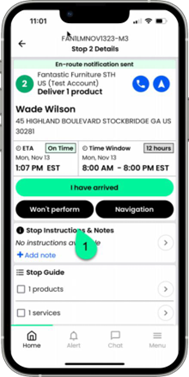
On the stop screen, tap Won’t perform
En la pantalla de parada, toca “No se realizará”.
Sur l’écran d’arrêt, appuyez sur « Ne fonctionnera pas ».
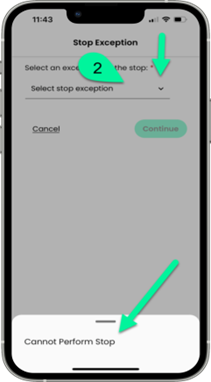
Using the dropdown, select the stop exception.
Utilizando el menú desplegable, seleccione la excepción de parada.
Dans le menu déroulant, sélectionnez l’exception d’arrêt.
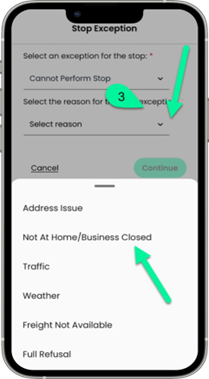
Select Not at Homer/Business closed as the reason
Seleccione “No se encuentra en casa/Negocio cerrado” como motivo.
Sélectionnez « Absent(e)/Commerce fermé » comme motif
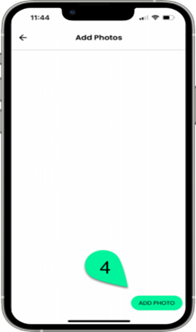
Tap ADD PHOTO to capture a photo of the consumer location.
Toque AGREGAR FOTO para tomar una fotografía de la ubicación del cliente.
Appuyez sur AJOUTER UNE PHOTO pour prendre une photo de l’emplacement du consommateur.
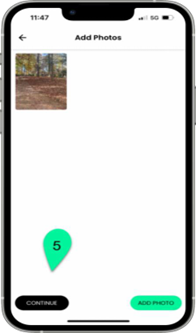
Once you have your photo, tap CONTINUE
Une fois votre photo prise, appuyez sur CONTINUER.
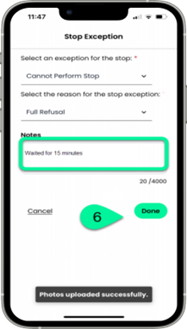
You can enter comments and tap Done to complete
Puedes introducir comentarios y tocar Listo para finalizar.
Vous pouvez saisir des commentaires et appuyer sur Terminé pour finaliser.